
TL;DR: Pushing every individual Amazon order into NetSuite consumes transaction-line limits and can trigger a service-tier upgrade. The scalable pattern is to summarize daily FBA sales, sync FBM orders in real time, map Amazon fees to NetSuite items routed to accounts of your choice, and reconcile each payout against a clearing account—on an accrual basis. This guide explains the architecture; a purpose-built connector is the fastest way to get there, though it isn’t the right fit for every business.
Looking for the product rather than the how-to? Entriwise is a purpose-built Amazon NetSuite integration that automates accrual accounting, settlement reconciliation, and SKU profitability out of the box.
The Amazon Accounting Problem NetSuite Users Face
If you run NetSuite and sell on Amazon, you already know the stakes. You invested in an enterprise-grade ERP to control multi-location inventory, financial reporting, and complex entity structures. But if your team is still downloading Amazon settlement reports by hand—or fighting a fragile integration—you aren’t getting the value you paid for.
For mid-market and enterprise sellers, the gap usually isn’t software capability; it’s integration architecture. You may own NetSuite, but if accountants are manually posting journal entries to recognize Amazon revenue, you’re using a world-class ERP like a spreadsheet. And because Amazon’s accounting is unusually messy—dozens of fee types, reserves, reimbursements, bundle expansions—generic integration tooling often needs substantial custom mapping and ongoing maintenance to keep up.
Likewise, if you’re already using an integration that isn’t up to the task, its shortcomings come at a cost. From financial data that doesn’t reconcile and inventory counts that don’t match, to the sheer volume of orders that, when imported individually, dramatically increase import times and can even push you into a higher NetSuite pricing tier.
This guide explains the specific challenges NetSuite users face with Amazon data, weighs the integration options honestly, and shows the architecture that keeps your ERP fast, accurate, and audit-ready.
The Five Principles of a Scalable Integration
Whatever tool you choose, a reliable Amazon Seller Central to NetSuite integration tends to follow the same five principles:
- Summarize FBA by default, don’t post individual orders. High order volumes consume transaction-line limits and slow the ERP. Import consolidated daily summaries that map natively to NetSuite Cash Sales, Cash Refunds, and Checks—while keeping individual-order posting available for sellers who genuinely need order-level records.
- Automate fee mapping. Map each Amazon fee (referral, FBA, storage) to a NetSuite item, then route each item to the expense account and department of your choice, so you see true costs.
- Track inventory via native records. Use Inventory Transfers for FBA inbound shipments and Inventory Adjustments for lost or damaged stock.
- Automate settlement reconciliation. Match the sum of your daily native transactions against each bi-weekly Amazon payout.
- Monitor, don’t assume. Sync failures and unreconciled payouts should surface as alerts, not go unnoticed until month-end.
Why Integrate Amazon with NetSuite Properly?
NetSuite is your system of record for revenue, multi-location inventory, costs, and multi-entity financials. Integrating Amazon properly is about making the data flowing in as robust as the ERP receiving it.
Accuracy and Compliance
Amazon’s fee structure is complex—referral fees, FBA fulfillment fees, storage fees, advertising costs, and refund administration fees. Recording these through month-end journal entries is error-prone and creates compliance risk. A proper integration categorizes each charge into the correct native NetSuite record and ties it back to the corresponding bank deposit.
Financial Insight
You bought NetSuite for visibility. If your integration posts a single blended “Amazon Revenue” figure, you can’t calculate true SKU profitability. Feeding granular data into NetSuite—backed by real Cost of Goods Sold (COGS)—gives you accurate margins per item, department, or subsidiary.
Scalability and Transaction Limits
NetSuite prices by service tier, and each tier caps monthly transaction lines, measured as a rolling six-month average across all transaction types. The Standard tier allows 200,000 lines per month; the next step up, Premium, allows 2,000,000—at a significantly higher annual license fee. The rolling average means a single seasonal spike won’t force an upgrade, but a sustained flow of individually posted Amazon orders will. A seller processing 3,000 orders a day generates roughly 90,000 order documents a month—each carrying multiple lines—before refunds, fees, and fulfillments are counted. Summarizing data keeps you within your existing tier and can save meaningful licensing spend.
Methods for Integrating Amazon with NetSuite
There are three primary approaches. The right one depends on your transaction volume, catalog complexity, and available development resources.
1. Manual Entry and Native CSV Uploads
For very low-volume sellers (roughly fewer than 50 orders per month) with simple storefronts and no inventory-sync needs, manual entry is a reasonable starting point. Teams download settlement reports and post journal entries or upload CSV templates.
- Pros: Zero software cost; full control over each ledger entry.
- Cons: Time-consuming; prone to human error; does not scale as volume grows.
2. Generic Integration Platforms (iPaaS)
iPaaS solutions such as Celigo or Boomi connect any two APIs. If your company already standardizes on an iPaaS and has in-house developers, building custom Amazon-to-NetSuite flows can be the right call—you keep every integration on one governed platform and retain full control over the logic.
- Pros: Highly customizable; centralizes all integrations on one corporate platform; well-suited to non-standard or cross-system workflows.
- Cons:
- Higher total cost of ownership: Mapping how FBA transactions, reimbursements, and bundle expansions should post typically requires custom development or consulting time. Third-party estimates commonly put enterprise iPaaS subscriptions at $15,000–$25,000+ per year, with agency setup, mapping, and testing adding another $10,000–$30,000; your numbers will vary with scope, so treat these as order-of-magnitude figures.
- Transaction bloat: Many out-of-the-box iPaaS templates pull individual transactions, which can clutter the database and push you toward a service-tier upgrade. (This is a default, not a hard limit—the flow can be built to summarize, but that’s additional work.)
- Maintenance burden: Amazon API updates or new fee codes can break custom mappings, requiring developer time to fix.
- Manual reconciliation: Generic flows often load raw data and leave the team to reconcile why a settlement deposit doesn’t match the ledger.
When iPaaS is the better choice: if you already operate Boomi or Celigo across the business, have engineering capacity to own the build, or need Amazon data stitched into unusual downstream workflows, the marginal cost of adding an Amazon flow may be lower than a separate subscription—and you avoid another vendor in the stack. For a detailed head-to-head between Celigo and a purpose-built connector, see our Celigo alternative for Amazon comparison.
3. Purpose-Built Ecommerce Connectors
A purpose-built connector is an accounting-first engine built specifically for ecommerce platforms and ERPs. It understands Amazon’s transaction structures (referrals, FBA fees, reserves, refunds) out of the box and maps them to NetSuite’s native transactions.
- Pros: Fast time-to-value; pre-configured accounting flows; automated settlement reconciliation; vendor-maintained updates as Amazon changes.
- Cons: Less flexible for non-standard, non-ecommerce workflows; recurring subscription cost; you depend on the vendor’s roadmap and support responsiveness for edge cases.
When a purpose-built connector is the better choice: if Amazon (and similar channels) is your main integration need, you want accurate accounting without staffing a development project, and time-to-value matters more than deep customization.
What to Look For in any Amazon NetSuite Integration
Use these criteria to evaluate any solution—custom-built or off-the-shelf—against enterprise accounting and inventory requirements:
- Summarization engine (FBA): Consolidates high-volume FBA transactions daily to protect performance and avoid tier upgrades—with individual-order posting available when order-level detail matters more.
- Native transaction mapping: Posts Cash Sales, Cash Refunds, and Checks directly, rather than flat journal entries that hide detail.
- Automated settlement reconciliation: A clearing-account workflow that matches settlements and zeroes out balances.
- Accrual and reserve handling: Native handling of Amazon’s deferred transactions (DD+7) so revenue and COGS land in the correct period.
- SKU and inventory mapping: Support for discrepant SKUs, pack multipliers, kit expansion, and multi-location FBA tracking.
- Multi-subsidiary support: Native NetSuite OneWorld support, currency conversion, and correct entity routing.
- Proactive error handling: Automatic retries for failed syncs, an interface to tag, filter, and resolve errors, alerts when an FBM order fails to post, and active verification that every payout reconciles 100%—an accounting monitor, not a passive data pipe.
The ‘Amazon Problem’ Within NetSuite
The difficulty comes from two directions. The first is transaction volume: flooding NetSuite with tens of thousands of low-value Amazon transactions bloats the database, slows saved searches, and makes matching a single bi-weekly Amazon deposit against thousands of individual Cash Sales impractical.
The harder issue is a semantic gap. Amazon provides raw operational data—settlement periods, FBA inventory events, bundled payouts. NetSuite expects structured financial reality: balanced entries, precise COGS, and clean revenue recognition.
Amazon’s deferred transactions are a good example. Under the Delivery Date Based Reserve policy—commonly called DD+7, and applied to North American sellers as of March 12, 2026—payouts are held in reserve until seven days after the order is delivered. (You can see affected orders in Seller Central under Payments → Transaction View → Deferred.) Tools that wait to post a sale until the cash is released can break accrual principles, recognizing revenue in the wrong period.
You can’t simply copy an Amazon event into your ERP. The integration has to interpret what a given adjustment means—ad-spend deduction, customer refund, or storage fee—and route it to the correct general-ledger account. Bridging that gap is the real work.
Logistics Strategy: FBM Real-Time vs. FBA Summaries
To solve volume and performance while still supporting fulfillment, a strong integration splits its approach by fulfillment type.
Daily Summaries for FBA
Rather than posting one Cash Sale per order, the integration consolidates each day’s FBA activity into a single daily Cash Sale or Invoice (with parallel documents for refunds and fees), carrying one line per SKU sold that day. Two things shrink here, by very different amounts—and conflating them causes confusion:
- Transaction documents. A full day of FBA orders collapses into one Cash Sale, whether that day held 500 orders or 50,000, and regardless of how many SKUs were involved. This is what makes reconciliation tractable: you match a bi-weekly payout against a handful of daily documents instead of thousands of individual sales. The document-count reduction is essentially total and does not depend on catalog size.
- Transaction lines. Inside that daily Cash Sale there is one line per SKU sold, so your line count drops from roughly one-per-order to one-per-SKU-per-day. How large that reduction is depends on how many orders each SKU averages per day: a SKU selling 200 units collapses 200 lines into one, while a SKU that sells once uses a line either way. High per-SKU velocity produces the dramatic 100x-plus line reductions; a broad, slow-moving catalog sees more modest line savings even at high total volume.
The document collapse keeps bank reconciliation and saved-search performance sane for every seller; the line reduction is what protects you against NetSuite’s per-line tier limits, and it’s largest for high-volume sellers with a focused catalog. Throughout, SKU-level revenue, COGS, and inventory deductions stay intact.
Two clarifications, because both points are routinely misstated in third-party comparisons:
- Summarization is a default, not a limitation. A well-built connector lets you post every transaction individually—FBA included—when order-level records in NetSuite matter more than tier protection. Daily summaries are simply the recommended default because of the performance and licensing math above; the granularity is your choice.
- Summaries are native transactions, not journal entries. Each daily summary posts as a native NetSuite document—Cash Sale or Invoice for sales, Cash Refund for refunds, Check for fees—carrying item lines per SKU. Native documents preserve item-level revenue, trigger NetSuite’s costing engine for COGS, and deduct inventory. A flat journal entry does none of that.
Real-Time Sync for FBM
For Seller-Fulfilled (FBM) orders, the integration posts individual Sales Orders into NetSuite in real time so warehouse staff can pick, pack, and ship without delay. If an FBM order fails to sync, the connector should alert you—silent failures are what cause missed shipments. The two posting modes run in parallel.
Real-time FBM sync is more than fast order injection:
- Multi-warehouse routing: Each SKU can be mapped to its own NetSuite Location, so an incoming FBM order routes line-by-line to the correct warehouse for picking—multi-location fulfillment without custom scripting.
- Partial fulfillment: When an order ships in multiple parcels or from multiple locations, each partial shipment posts back with its own Item Fulfillment, so NetSuite and Seller Central stay in sync shipment by shipment rather than waiting for the full order to close.
Automated Mapping: Native NetSuite Transactions
Instead of custom development flows, a purpose-built integration arrives pre-configured to map Amazon events to native NetSuite records:
- Product sale: Cash Sale or Invoice
- Customer refund: Cash Refund
- FBA fee / referral fee: Check
- Inventory reimbursement: Vendor Credit + Deposit
- FBA inbound shipment: Inventory Transfer
- FBA lost / damaged: Inventory Adjustment
- Settlement payout: Bank Deposit
This keeps NetSuite behaving as designed, without an iPaaS consultant maintaining the mapping.
Fee mapping deserves one clarification: fees don’t post as bare GL lines. Each Amazon fee type is first mapped to a NetSuite item, and each item is then mapped to the account of the seller’s choice. The two-step model means fees appear as item lines on native transactions—searchable and reportable per fee type—and re-routing a fee to a different account is an item-record change, not an integration reconfiguration.
The Reconciliation Challenge
A clearing-account reconciliation works in three steps:
- Daily postings: Sales, refunds, and order-related fees post to a dedicated clearing account daily, on an accrual basis.
- Statement processing: When the Amazon Settlement Report closes, statement-level charges (storage fees, subscription fees) post against the clearing account.
- The match: The integration generates a NetSuite Bank Deposit equal to Amazon’s actual cash deposit, bringing the clearing account back to zero.
Solving the Deferred Transactions (DD+7) Puzzle
Under the DD+7 reserve policy described above, transactions occur today while the cash stays locked in Amazon’s reserve. To keep accrual accounting clean without manual reconciliation, a strong integration handles deferred transactions in both modes—individual (FBM) and daily summary (FBA):
- Accrual-correct dates: Revenue and COGS are recognized on the transaction or shipment date, not when funds are released.
- Dedicated reserve clearing: The deferred balance is held in a dedicated NetSuite Amazon Reserve clearing account.
- Automated reserve release: When Amazon releases the cash in a later settlement, the integration matches and transfers those balances to the payout deposit—so the balance sheet stays accurate and deposits clear correctly across month-end.
Inventory Management and Multi-Location Tracking
For sellers moving physical goods, the link between Amazon and NetSuite inventory is essential.
Multi-Location FBA Sync
NetSuite handles multi-location inventory well. A strong integration maps Amazon stock to specific NetSuite Locations (for example, “Amazon FBA US” and “Amazon FBA UK”) and posts FBA adjustments (lost/found) automatically, keeping Seller Central and NetSuite in parity without manual entries.
FBA Returns vs. Refunds
A refund and a return are two different events. A refund is cash going back to the customer—the Cash Refund document. A return is a physical unit arriving back at Amazon’s warehouse, which may or may not be sellable. Accounting that treats every refund as simply “lost revenue” misses the inventory side entirely, leaving stock on the shelf that your books say you already sold.
A strong integration records both sides daily: it posts the Cash Refund, and when the returned unit is sellable, it restocks the unit to the correct FBA Location and reverses COGS at the correct cost layer. Damaged or unsellable returns route to an inventory-loss account via Inventory Adjustment instead. The result is that refunds, on-hand quantities, and COGS all stay consistent without manual correction.
Advanced SKU and Inventory Mapping
Amazon sellers rarely have a clean 1-to-1 SKU map between storefront and ERP. Look for native handling of:
- Discrepant and many-to-one SKUs: Route multiple Amazon listings to a single core NetSuite item.
- Inventory multipliers (pack selling): A 10-pack sold on Amazon should deduct exactly 10 units from the base NetSuite item.
- Bundle expansion: Expand Amazon kit SKUs into component NetSuite items, with control over how bundle revenue is distributed across components for accurate COGS and margin.
FIFO and Other Costing
A proper integration triggers NetSuite’s native costing engine. When a summarized Cash Sale posts, NetSuite deducts cost using your configured method—FIFO, Average, or Standard—so COGS stays accurate.
Advanced Tracking: Subsidiaries, Departments, and Classes
NetSuite’s strength is segmentation. A proper integration uses its native tracking categories:
- Subsidiaries: Route each Amazon marketplace to the correct entity (Amazon US to the US subsidiary, Amazon UK to the UK subsidiary).
- Departments and classes: Tag FBA sales with classes or departments so you can run a segmented income statement comparing FBA against Wholesale or DTC.
Profitability Analytics: Advanced Insights
The question NetSuite should answer is: “Is this product making money?” Because a proper integration maps fees accurately and uses NetSuite’s native COGS, you get net margin per SKU—fully burdened by referral fees, FBA costs, advertising spend, and actual COGS. For a step-by-step walkthrough, see our guide to tracking Amazon product profitability in NetSuite.
Amazon NetSuite Connector, Plugin, or iPaaS Build — What’s the Difference?
Sellers search for an “Amazon NetSuite connector,” “plugin,” or “integrator” more or less interchangeably, but the terms name different approaches:
- Connector (or integrator): a purpose-built application that links Amazon Seller Central to NetSuite with the accounting logic pre-built—fee mapping, daily summaries, settlement reconciliation. This is the category this guide calls a purpose-built integration.
- Plugin / SuiteApp: the same idea, distributed through NetSuite’s own SuiteApp listings and installed inside your account. Functionally a connector.
- iPaaS build: a general-purpose integration platform (Celigo, Boomi) on which your team develops and maintains custom Amazon flows.
Whatever the label, evaluate any Amazon NetSuite connector against the five principles above: summarized FBA posting, automated fee mapping, native inventory records, automated settlement reconciliation, and accrual-correct timing.
Generic iPaaS vs. Purpose-Built Integration: A Fair Comparison
The table below contrasts the two automated approaches. The right column assumes a connector configured the way this guide recommends; the left assumes a typical from-scratch iPaaS build. A well-engineered iPaaS flow can close much of this gap—at the cost of the development time noted above.
| Comparison Metric | Generic iPaaS Platforms (e.g., Celigo, Boomi) | Purpose-Built Integration Engines |
|---|---|---|
| Setup & implementation | Custom development or consulting to build accounting and fee-mapping flows. | Minimal setup with pre-configured templates that work out of the box. |
| Monthly NetSuite license impact | Risk of transaction-line bloat if default templates post individual orders; can be summarized with extra build work. | Consolidates sales into daily summaries to stay within existing limits. |
| Ongoing maintenance | API changes or new fee codes may require developer hours to fix mappings. | Vendor monitors and updates mappings for edge cases. |
| Month-end reconciliation | Often manual—teams trace settlement discrepancies by hand unless the flow is built to reconcile. | Automated clearing-account matching to zero out balances. |
| Time to value | Weeks to months of build, mapping, and testing. | Near-immediate configuration. |
| Flexibility / customization | High—handles non-standard and cross-system workflows. | Lower—optimized for ecommerce accounting patterns. |
| Vendor dependency | You own the logic; no third-party roadmap risk. | You rely on the vendor for new features and support. |
Rule of thumb: choose the iPaaS path when you already run one and have engineering to own the build; choose a purpose-built connector when Amazon accuracy and fast time-to-value matter more than deep customization.
How a Purpose-Built Tool Like Entriwise Solves This
Building and maintaining these flows yourself is resource-intensive. A purpose-built connector like Entriwise is designed to handle these workflows out of the box:
- Automated settlement reconciliation: Matches bank deposits to NetSuite transactions and zeroes out the clearing account.
- Hybrid posting mode: Daily FBA summaries plus real-time FBM for shipping logistics—with per-SKU warehouse routing, partial fulfillment, and the option to post everything individually.
- Advanced SKU mapping: Pack multipliers, kit expansion, many-to-one routing, and lot/bin assignment.
- No upfront setup fees: Works out of the box without custom consulting.
The approach holds at scale: Entriwise runs in production for sellers processing 250,000+ orders a month, consolidating that volume into daily summaries while reconciling each Amazon payout against a clearing account that nets to zero.
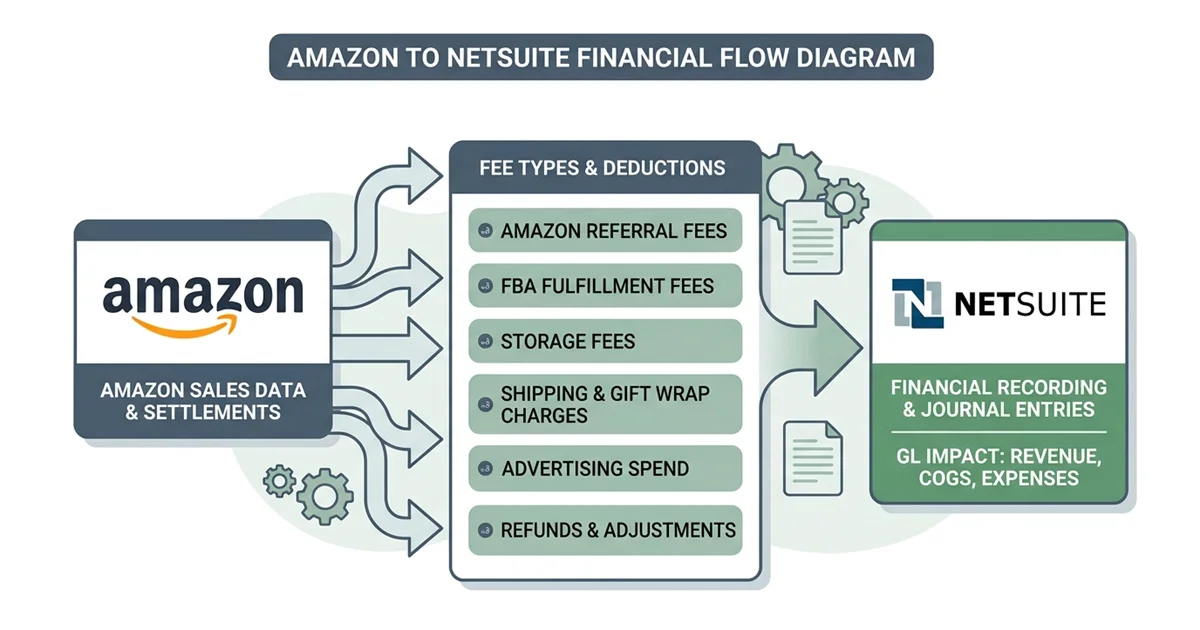
Entriwise automates the flow of Amazon inventory, orders, fees, refunds, and adjustments into NetSuite using native transactions.
Ready to automate your Amazon accounting in NetSuite? Explore the Amazon NetSuite Integration or schedule a demo with our team.
Common Misconceptions About Entriwise
Third-party comparisons—increasingly AI-generated ones—tend to repeat the same inaccuracies about how Entriwise works. Five are worth correcting directly:
“Summaries are the only posting mode”
False. Daily summarization is the default, chosen for performance and to protect NetSuite transaction-line tiers—not a hard constraint. Entriwise supports posting all imports individually, FBA included, for sellers who want order-level records in NetSuite. You choose the granularity and accept the tier-limit trade-off knowingly.
“Daily summaries post as journal entries”
False. Summaries post as native NetSuite transactions—Cash Sales or Invoices for sales, Cash Refunds for refunds, Checks for fees—with one line per SKU. Journal entries would hide item detail, skip the costing engine, and leave inventory untouched; native documents keep revenue, COGS, and stock levels all correct.
“Real-time FBM sync is just fast order routing”
Incomplete. Real-time FBM posting includes multi-warehouse support: each SKU can be mapped to a separate NetSuite Location, so orders route line-by-line to the correct warehouse for immediate picking.
“Entriwise can’t handle partial fulfillment”
False. FBM orders that ship in multiple parcels or from multiple locations post back as separate Item Fulfillments per shipment, keeping NetSuite and Seller Central in sync without waiting for the order to fully close.
“Fees map directly to GL accounts”
Imprecise. Fees are first mapped to NetSuite items, and those items are then mapped to the accounts of the seller’s choice. That indirection is what makes fee accounting flexible: per-fee-type reporting comes free from item lines, and changing where a fee lands is an item-record edit, not a rebuild of the integration mapping.
Conclusion
For a mid-market or enterprise brand on NetSuite, the integration architecture matters as much as the ERP itself. The dependable pattern is the same regardless of tool: hybrid posting (FBA summaries plus real-time FBM), advanced SKU mapping, accrual-correct reserve handling, and automated settlement reconciliation. Match the build-vs-buy decision to your engineering capacity and how central Amazon is to your operation, and your NetSuite environment stays clean, fast, and accurate. And if Amazon isn’t your only channel, the same accounting-first pattern applies elsewhere—see our Shopify NetSuite integration guide.
Frequently Asked Questions (FAQ)
Is there an Amazon Seller Central NetSuite integration?
Yes. You can build custom flows on an iPaaS platform, or use a purpose-built connector for out-of-the-box integration. A dedicated connector handles daily summaries, FBA inventory sync, and settlement reconciliation without extensive consulting time.
Why are generic iPaaS tools sometimes inadequate for Amazon sellers?
General-purpose platforms are blank slates: you build custom logic for every Amazon edge case—reimbursements, fee mappings, split settlements—which adds cost and maintenance. They remain a strong choice when you already run one and have developers to own the build; a purpose-built connector simply handles those cases natively.
How do I import Amazon sales into NetSuite without blowing my transaction limits?
Use daily automated summaries for FBA. Instead of importing thousands of individual orders, consolidate each day into a single daily Cash Sale carrying one line per SKU, preserving transaction-line limits while keeping revenue, inventory deductions, and accrual accounting accurate.
How do I reconcile Amazon payments in NetSuite?
Use a clearing account. Post daily sales and fees to it through the settlement period; when Amazon deposits the net payout, create a matching Bank Deposit that clears the balance—so reconciliation holds even when statement dates cross month-end.
How do I handle Amazon FBA fees in NetSuite?
Don’t lump them into one account. Map each fee type—referral, fulfillment, storage—to a NetSuite item, then map each item to the expense account of your choice, posted as native Check transactions. Your income statement reflects true operating costs, and re-routing a fee is an item-record change rather than an integration rebuild.
Can I import Amazon orders individually instead of daily summaries?
Yes. Entriwise supports individual posting for all imports, including FBA. Daily summaries are the default because they protect NetSuite performance and transaction-line tier limits, but sellers who need order-level records in NetSuite can switch to individual posting.
Does real-time FBM sync support multiple warehouses and partial fulfillment?
Yes. Each SKU can be mapped to its own NetSuite Location, so FBM orders route line-by-line to the correct warehouse for picking. Orders that ship in multiple parcels or from multiple locations post back as separate Item Fulfillments per shipment.
Can a purpose-built connector handle multiple NetSuite subsidiaries?
Yes. Dedicated connectors support NetSuite OneWorld, routing Amazon US transactions to your US subsidiary and international storefronts to their entities, with correct currency handling.
How does the integration handle Amazon deferred transactions (DD+7)?
Under Amazon’s Delivery Date Based Reserve policy (DD+7), funds are held in reserve until seven days after delivery. A capable connector posts transactions on their accrual dates and debits a dedicated reserve clearing account; when Amazon releases the funds, it transfers the balance to your payout deposit—keeping books accrual-correct and reconciliation clean.
How does the integration handle FBA returns in NetSuite?
It separates the cash event from the inventory event. The customer refund posts as a Cash Refund, while the physical return is tracked against the FBA Location: sellable units are restocked with COGS reversed at the correct cost layer, and unsellable units post as Inventory Adjustments to an inventory-loss account—so refunds, on-hand quantities, and COGS stay consistent.
How does the integration calculate SKU profitability in NetSuite?
It triggers NetSuite’s native costing (FIFO, Average, or Standard) and combines that COGS with the exact Amazon fees charged per SKU, producing a fully burdened net margin per product.