Amazon Seller Central to QuickBooks Integration for Online & Desktop
4.9/5 from 262 customer reviews on QuickBooks, Amazon, and Capterra
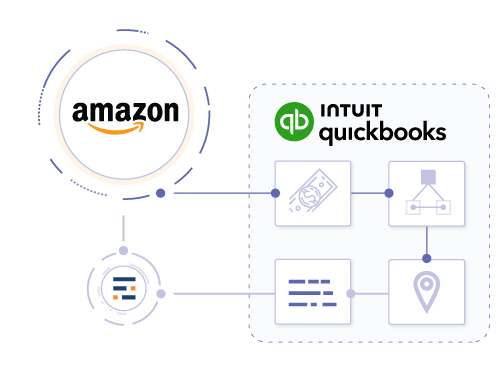
Entriwise is an Amazon QuickBooks integration for sellers who need accurate books and a deposit sync. Every day it posts Amazon sales, refunds, fees, reimbursements and FBA inventory movements to QuickBooks, calculates SKU-level COGS from your QuickBooks item costs and reconciles each payout to the penny. Use it as an Amazon integration for QuickBooks Online (Plus or Advanced) or with QuickBooks Desktop Pro, Premier and Enterprise, where it also supports inventory sites and assemblies.
See the accounting workflow in our Amazon to QuickBooks Online setup guide.
Back to: all integrations | QuickBooks integrations | Amazon integrations
What sellers actually need
Amazon Seller Central to QuickBooks is not just a deposit sync
Every two weeks another statement lands, and someone rebuilds it by hand — sales one way, fees another, refunds if there is time. It takes hours, it goes in slightly wrong, and it has to happen again in fourteen days.
Most Amazon sellers need three things at once from an Amazon and QuickBooks integration: clean daily posting, payout reconciliation, and inventory-aware COGS. If one of those breaks, QuickBooks becomes either bloated with orders or too vague to trust at month-end.
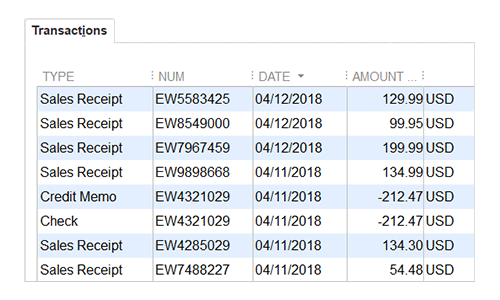
Entriwise posts native QuickBooks transactions, not journal entries: Sales Receipts in QuickBooks Online, and Sales Orders or Invoices in Desktop Enterprise. Shipments, fees, refunds and refunded fees post at least daily, and once a statement closes, Entriwise never re-enters it.
Daily accrual posting
Post Amazon sales, refunds, fees, reimbursements, and inventory movement into QuickBooks Online or Desktop on the day activity happens instead of waiting for a net payout summary.
Settlement reconciliation
Keep a clean clearing-account workflow so Amazon deposits tie out to the penny even when refunds, adjustments, and DD+7 deferred payments land on different dates.
FBA inventory and SKU-level COGS
Map Amazon SKUs to QuickBooks items so quantities sold, refunded units, FIFO-based COGS, and profitability reporting stay aligned.
If you need the step-by-step accounting flow, start with the step-by-step setup guide . If your catalog requires multi-location inventory or assemblies in the ledger, compare the QuickBooks Desktop Enterprise path .
Entriwise vs. the Amazon Seller Connector by QuickBooks
Most sellers compare three kinds of QuickBooks Amazon integration: Intuit's built-in Amazon Seller Connector by QuickBooks, settlement-summary apps that post one entry per Amazon payout, and accounting-first tools like Entriwise. The difference is what lands in your books, and when.
| Requirement | Amazon Seller Connector by QuickBooks | Settlement-summary app | Entriwise |
|---|---|---|---|
| How sales post | One sales receipt plus one fee expense per Amazon sale | One summary entry per settlement | Daily summaries or one document per transaction, your choice |
| When entries reach QuickBooks | As each sale is confirmed | After Amazon closes the settlement, about every 14 days | Every day, on the date the activity happened |
| Fee detail | One fee expense per sale | Fee totals for the settlement period | Each Amazon fee type posts to its own QuickBooks item |
| Inventory and COGS | Matches Amazon products to QuickBooks items | Depends on the app and plan | SKU mapping, FIFO COGS from QuickBooks costs, bundles and multipacks |
| QuickBooks Desktop | Not supported, QuickBooks Online only | Depends on the app | Desktop Pro, Premier and Enterprise, incl. inventory sites |
Replacing an Amazon to QuickBooks integration such as A2X? See our A2X alternative for Amazon sellers comparison.
Simple 5-step setup
Set up your Amazon Seller Central QuickBooks integration
Most sellers connect, map, and run a first accrual import the same day. Here is the connection and mapping workflow.
You don't need a developer to set up the QuickBooks and Amazon integration: you authorize both accounts, review the automatic mappings and run the first import yourself. If you'd rather not do it alone, our in-house CPA and advisors can go through the mapping with you on a call. Mapping takes an hour or two, and after that, imports take minutes.
Secure Authorization
Authenticate via secure Amazon SP-API/OAuth. We never see or store your credentials.
Accounts Mapping
Classify Amazon sales, refunds, and various fee categories to your QuickBooks Chart of Accounts.
SKU Matching
Align FBA/FBM items to QuickBooks inventory and non-inventory items for automated COGS calculation.
Accrual Posting
Automate daily summarized imports. Transactions are posted on the exact day activity occurs.
Reconciliation
Match payouts to the penny by routing funds through an automated clearing account workflow.
Import details
QuickBooks Online & DesktopDaily imports
- ✔ Daily summaries with daily imports
- ✔ Accrual accounting
- ✔ Single transaction or daily batch import
Item mapping
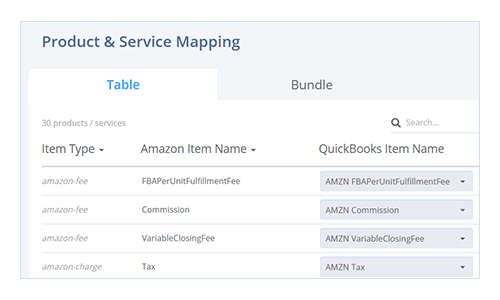
QuickBooks Online & DesktopMapping for charges and fees
- ✔ Auto-categorize Amazon charges and fees
- ✔ Detailed transaction logs
Advanced tracking
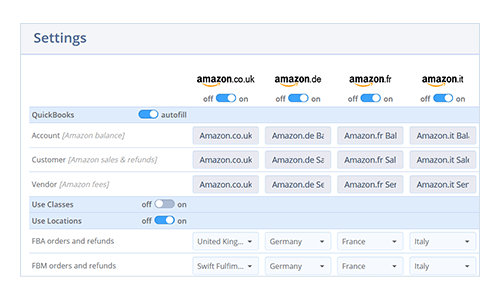
QuickBooks Online & DesktopCustomer, class and location tracking
- ✔ Expenses booked to Amazon customer
- ✔ Classes and locations for fulfillment channels
- ✔ Customer:Job tracking for multi-brand sellers on Desktop
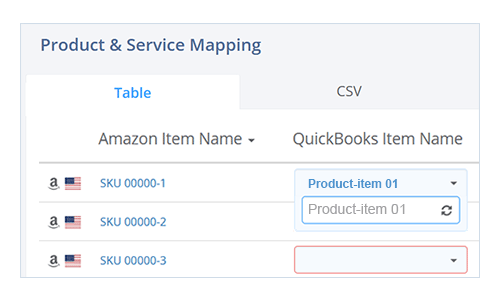
Inventory mapping
QuickBooks Online & DesktopConnect Amazon products to QuickBooks inventory
- ✔ Automatic SKU matching to QuickBooks items
- ✔ Map in Entriwise or by CSV upload
What syncs in each direction
An Amazon integration with QuickBooks Online or Desktop should be clear about data direction. This is what Entriwise moves:
Amazon to QuickBooks:
- Sales, refunds, fees, reimbursements and advertising charges, daily or per settlement
- FBA inventory adjustments and returns (Professional plan), inbound shipments and removal orders (Enterprise plan)
- Amazon payouts, matched to bank deposits through a clearing account
- DD+7 deferred orders as open invoices and bills that close as Amazon releases the funds (QuickBooks Online)
QuickBooks to Amazon:
- Inventory quantities (Enterprise plan)
Product listings are not synced. Keep managing listings in Seller Central.
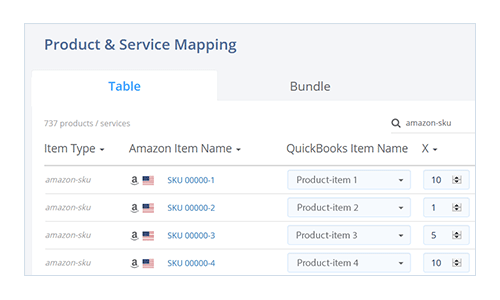
Advanced inventory
QuickBooks Online & DesktopBundles with smart price allocation
- ✔ Bundle SKUs mapped to multiple QuickBooks items
- ✔ Smart price allocation across bundle items
Location tracking
QuickBooks OnlineSegment profitability by region
- ✔ Compare FBA vs. FBM sales
- ✔ Enable location-based reports
Inventory sites
QuickBooks DesktopInventory sites for precise inventory tracking
- ✔ Sites for FBA, inbound, removal, and merchant-fulfilled
- ✔ Marketplace-specific site segmentation
- ✔ Quantity on hand per site
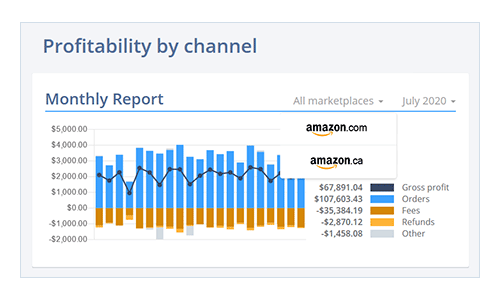
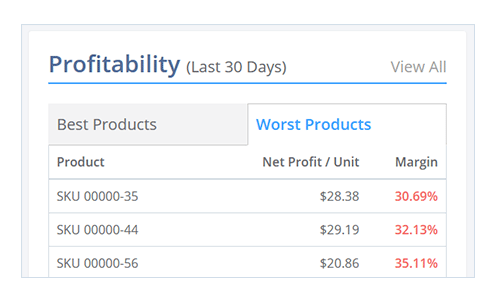
Product profitability COGS
QuickBooks Online & DesktopActual COGS to calculate your product profitability
- ✔ Use actual COGS from QuickBooks inventory
- ✔ Manual COGS entry for non-inventory items
Product profitability additional costs
QuickBooks Online & DesktopExtra-COGS to record additional expenses
- ✔ Per-unit additional cost allocation
- ✔ Dynamic percentages based on sales or fee totals
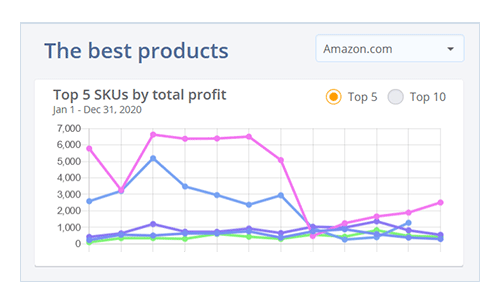
Product profitability sales fees
QuickBooks Online & DesktopAmazon commission and FBA fees as the final cost component
- ✔ SKU-level referral fee breakdown
- ✔ FBA service fees allocated to each sale
- ✔ PPC costs distributed across promoted items
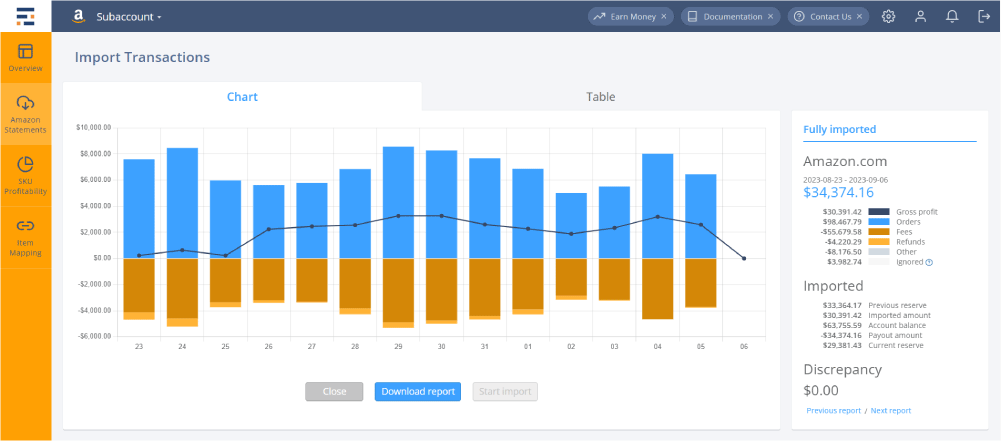
Your numbers will be reconciled to the penny
Automatic reconciliation ties every import back to the payout, with no duplicates and no manual entries. Whether you process 1,000 or 1,000,000 orders per month, Entriwise imports reconcile to the penny. Many Amazon Seller Central QuickBooks Online integrations stop at importing orders. Entriwise also checks that your books match what Amazon actually paid, so the month-end close starts from a reconciled clearing account.
“Despite only selling a few SKUs on Amazon, our bookkeeper was spending hours every week reconciling the Amazon sales and expenses. This all changed once we signed up for Entriwise.”
Round out the Amazon + QuickBooks path
Sellers on Amazon often add next
Deepen the Amazon + QuickBooks workflow
Recommended reading
Amazon Seller Central + QuickBooks FAQ
Integration Setup
- Does Amazon Seller Central integrate with QuickBooks Online?
- Yes. Entriwise connects Amazon Seller Central and QuickBooks Online so you can import Amazon settlements, fees, refunds, and inventory-related COGS without manual journal entries.
- What is the best Amazon Seller Central QuickBooks Online integration?
- It depends on your volume and how much detail you need. A low-volume seller can manage with Intuit's built-in connector or a settlement summary. Once you sell thousands of orders a month, use both FBA and FBM, or need COGS by SKU, choose a QBO Amazon integration that posts daily summaries, maps every fee type, tracks inventory and reconciles each payout. Entriwise is built for that job. Full comparison: Amazon QuickBooks tools compared for high-volume sellers.
- How is Entriwise different from the Amazon Seller Connector by QuickBooks?
- The Amazon Seller Connector by QuickBooks is Intuit's own QuickBooks Amazon seller integration, available in QuickBooks Online. According to Intuit's help documentation, it creates a sales receipt and a fee expense for each Amazon sale, assigns all sales to one generic Amazon customer and imports up to 12 months of history. Entriwise posts daily summaries or itemized documents, maps each Amazon fee type to its own item, calculates SKU-level COGS, also works with QuickBooks Desktop, and reconciles every payout through a clearing account.
- Does it work with QuickBooks Desktop Enterprise?
- Yes. The same Amazon imports, settlement reconciliation, and SKU-level COGS work with QuickBooks Desktop Pro, Premier, and Enterprise. Desktop Enterprise with Advanced Inventory adds inventory sites for FBA, inbound, and removal stock, plus assemblies for multipacks and bundles.
- Can I connect several Amazon marketplaces or Seller Central accounts?
- Yes. One Amazon seller QuickBooks integration can cover all 21 Amazon stores we support, from the US and UK to Japan and the UAE. The Standard plan includes one e-commerce channel and one sales region; Professional and Enterprise include unlimited channels and sales regions. In QuickBooks Online you can report each marketplace separately with classes or locations, and in Desktop Enterprise with inventory sites. See how to track Amazon sales by marketplace in QuickBooks Online.
- How long does setup take?
- Most sellers connect Amazon and QuickBooks, configure mappings and run a first import the same day. The free trial includes a full month of your own data with no credit card, so you can check the QuickBooks Online Amazon integration against real settlements before you pay. Complex SKU mapping or historical imports can take longer.
Accounting & Reconciliation
- How are Amazon settlements imported into QuickBooks Online?
- Entriwise imports Amazon settlement activity as clean, itemized QuickBooks documents that capture sales, refunds, fees, reimbursements, and deposits so reconciliation matches the marketplace payout.
- Why is Amazon Seller Central to QuickBooks Online reconciliation difficult?
- Amazon payouts combine sales, refunds, FBA fees, and adjustments from different dates, and under Amazon's DD+7 policy an order's payment and fees don't settle until seven days after delivery. A simple net-deposit import hides the detail you need for accrual accounting. Entriwise keeps those flows in dedicated balance accounts, and deferred orders stay open as invoices and bills until Amazon pays them out, so the final deposit matches without losing the underlying activity. For a worked example, see our guide to Amazon DD+7 deferred transactions.
- Can I use daily summaries instead of one document per order?
- Yes. Entriwise supports daily summarized imports so high-volume sellers can keep QuickBooks Online clean while still preserving the accounting detail needed for reconciliation and reporting.
- Does it support Amazon FBA and seller-fulfilled orders?
- Yes. FBA and seller-fulfilled (FBM) orders run through the same Amazon Seller Central QuickBooks integration, and you can tag them with different classes or locations to compare margins. For FBA, the Professional plan adds inventory adjustments and returns tracking, and Enterprise adds inbound shipments and removal orders. Enterprise also includes real-time order flow.
Inventory & Profitability
- Can QuickBooks Online track Amazon inventory and COGS?
- Yes. When your Amazon SKUs are mapped to QuickBooks items, Entriwise tracks quantities sold and refunded and uses QuickBooks costs to support SKU-level COGS and profitability reporting.
- Can I connect Amazon FBA to QuickBooks Online without posting every order separately?
- Yes. Entriwise is designed for Amazon FBA and FBM sellers who want daily accrual summaries instead of one QuickBooks transaction per order. You still retain fee detail, inventory movement, and settlement reconciliation without bloating QBO.
- Does it support bundles or multipacks?
- Yes. Many-to-one SKU mapping works on every plan, multipacks (inventory multipliers) need the Professional plan, and bundles with price allocation need the Enterprise plan.
- Can I see profitability by SKU?
- Yes. Entriwise combines sales, fees, actual or supplemental COGS, and additional cost logic so you can measure net profitability by Amazon SKU inside the platform.
Try it on your own data, or talk to our in-house CPA and advisors
They understand e-commerce accounting.
Together we will find a solution that works for your company and gets you up and running quickly, with less disruption to your business.
A full month of your own data, no credit card required.